Scam Warning - Fake “Google Storage Full” Email
I encourage WGPC members to use Google Photos to store and share your images, and many have upgraded to Google One storage plans.
This morning I received three copies of the email shown below, claiming my Google storage was almost full and that my account would be deleted within 24 hours unless I updated my payment details.
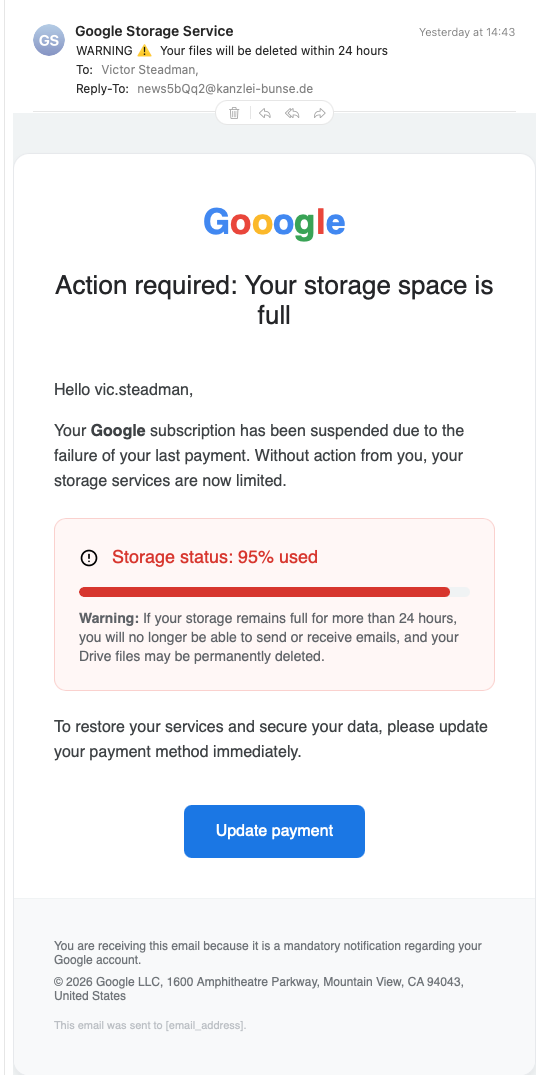
How to spot the scam:
1 – Google Logo spelt Wrong
2 - Fake sender name
3 - Reply address not Google
4 – Panic-inducing warning
5 - Fake storage warning graphic
At first glance it looks convincing, it uses the Google logo (look closely, it is spelt wrongly), but this message is definitely a phishing scam.
Here are the warning signs.
1. The Google logo is wrong
The logo in the email spells “Gooogle” with three o’s.
A genuine Google email would never contain a spelling error in its own logo.
2. The Reply-To Address Is Completely Wrong
At the top of the message you can see:
Reply-To:
news5bQq2@kanzlei-bunse.de
This is clearly not a Google address.
Real Google emails come from domains such as:
• @google.com
• @accounts.google.com
• @notifications.google.com
The domain kanzlei-bunse.de appears to belong to a German legal office and has nothing to do with Google.
This alone proves the email is fake.
3. The Sender Name Is Suspicious
The email claims to be from:
“Google Storage Service”
Google does not use this name for its storage notifications.
Official messages normally come from services such as:
• Google One
• Google Photos
• Google Account
Scammers often invent names that sound plausible.
4. The Message Uses Panic Tactics
The subject line says:
“WARNING – Your files will be deleted within 24 hours”
Scammers deliberately create urgency and fear so people act without thinking.
Large companies like Google rarely threaten immediate deletion in a single email.
5. The Payment Story Makes No Sense
The email claims:
“Your Google subscription has been suspended due to failure of your last payment.”
But it also claims:
“Storage status: 95% used”
These two statements contradict each other.
If a payment failed, the account would normally revert to the free plan, not suddenly jump to 95% usage.
In phishing emails the wording often does not quite make sense.
⸻
6. The “Update Payment” Button Is the Trap
The blue “Update payment” button is the real objective of the scam.
Clicking it would almost certainly take you to a fake Google login page designed to steal:
• your Google password
• your credit card details
• possibly access to your email and photos.
7. The Footer Contains Another Clue
At the bottom the message says:
“This email was sent to [email_address].”
Real automated emails insert your actual address, not a placeholder.
This suggests the email template was poorly copied.
The Safe Way to Check Your Storage
If you ever receive an email like this:
Do not click anything in the email.
Instead:
1. Open your browser.
2. Go directly to
https://photos.google.com or https://one.google.com
3. Check your storage status there.
If there really is a problem, Google will show it in your account dashboard.
Why Photographers Are Targeted
Photographers are frequent targets because we store large numbers of photos in the cloud.
Scammers know that messages about:
• “storage full”
• “payment failure”
• “account suspension”
are likely to get attention.
A Simple Rule
When dealing with emails about your accounts:
Never use the links in the email.
Always go directly to the service website yourself.
Update 0900
While I was writing this blog post I received another 3 similar emails, these are shown as being from “Stockage Google” and now say my storage is 98% full.
I have also realised all these emails were sent to my cantab email address but I use a Google mail address for my Google login. My cantab email does not have a google storage account!
Update 18 March
They are certainly persistant; I have lost count of the number of emails in the past couple of days, each one slightly different but none any more believable.
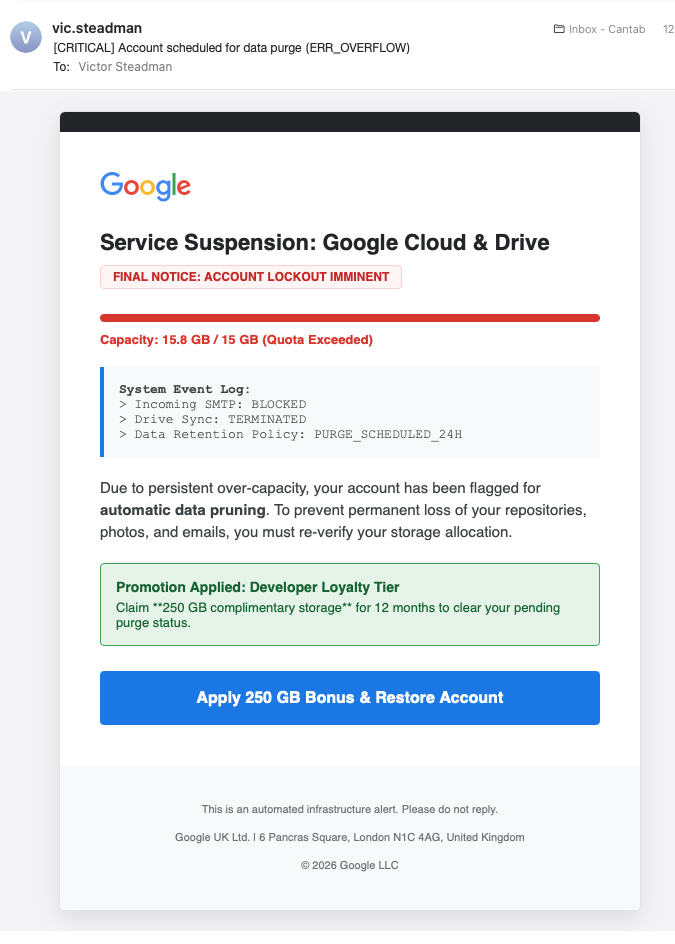
The latest email, from Vic.steadman to Victor Steadman, I am talking to myself.
The Google logo is now spelt correctly, the threat has increased to “lockout Imminent”, “automatic data pruning”, “permanent loss …”, and a new incentive 250 GB complimentary storage. All I have to do is press the blue button and fill in the resulting form to give them all sorts of personal data.
And all for an email address that does not have a Google account!