Scam Watch – Fake McAfee Renewal Emails
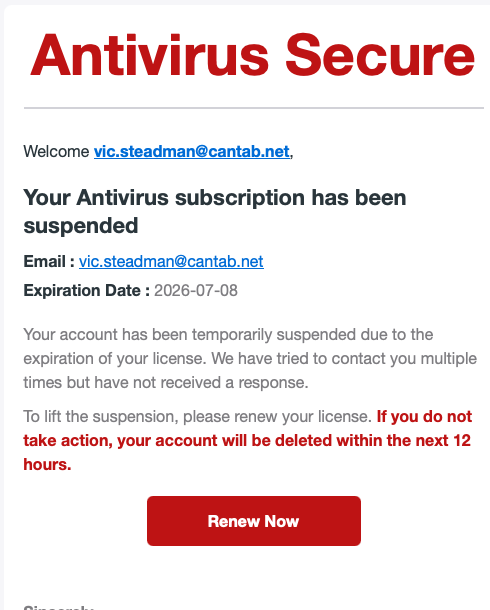
A couple of WG owners have contacted me this week after receiving emails claiming that their McAfee Antivirus subscription has been suspended and urging them to renew immediately.
I also received the email which was clearly a phishing scam. I don’t have a McAfee subscription, and the email came from an unrelated German email address rather than from McAfee itself.
Scammers often use well-known company names because they know many people will recognise them. They also try to create a sense of urgency with phrases such as:
Your account has been suspended.
Your licence has expired.
Renew within 12 hours or your account will be deleted.
The aim is to panic you into clicking the Renew Now button before you stop to think.
How to spot a phishing email
Before clicking any link, ask yourself a few simple questions:
Do I actually have an account with this company?
Does the sender’s email address look genuine? Large companies send emails from their own internet domain, not from unrelated addresses.
Is the message trying to frighten or rush me into taking immediate action?
Does it ask me to click a button to renew or verify my account?
If any of these raise doubts, treat the email as suspicious.
What should you do?
If you receive a suspicious email:
Do not click any links or open any attachments.
Report it as phishing using your email program if that option is available.
Forward the email to the National Cyber Security Centre at report@phishing.gov.uk. Their Suspicious Email Reporting Service investigates phishing campaigns and works to have fraudulent websites removed.
If the email is pretending to be from McAfee, forward it to scam@mcafee.com so McAfee can investigate the misuse of its name.
Once reported, delete the email.
Don’t panic
One final point that often worries people.
Simply receiving or reading a phishing email will not infect your computer. The danger comes from clicking links, opening malicious attachments, or entering passwords, bank details or payment information into fake websites.
When in doubt, don’t click. If you think an email might be genuine, ignore the links in the message and instead visit the company’s official website directly or use its official app.
A few moments of caution can save a great deal of inconvenience.