Staying safe online: five practical steps for WGPC members
Cyber security might seem an unusual subject for a photography blog. But as digital photographers, we spend plenty of time online: sharing pictures, watching tutorials (I wish), and keeping in touch with fellow club members. Looking after our online security is part of looking after our photography.
Many of us at WG did not grow up with computers, and confidence with technology varies. Scams can catch anyone, however experienced they are.
I have seen an increasing number of WG residents affected by email scams and compromised accounts. When criminals gain access to someone’s inbox, they can collect contact details and send convincing messages to friends and neighbours. A message appearing to come from someone we know can easily catch us off guard.
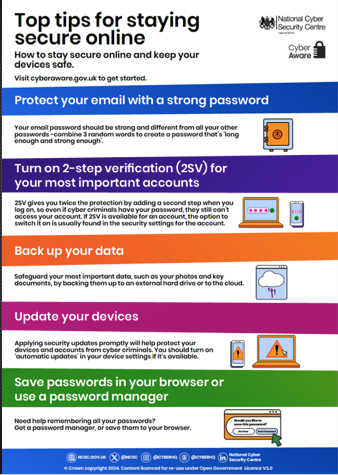
The government’s National Cyber Security Centre (NCSC) offers a useful guide to staying secure online. Here are their five practical steps, with my own observations from helping people at WG.
1. Give your email account a strong, unique password
Your email account is particularly important because it can often be used to reset passwords for other accounts. Its password should be different from every other password you use—not simply a variation with a different number at the end.
If you need a password you can remember, the NCSC recommends combining three unrelated words. Choose your own combination, avoiding names, birthdays etc. A password manager can also generate a strong password for you. NCSC advice on three random words.
Treat an unexpected request for your email password with caution. Close the message or page and open your usual email app, or visit your provider’s website using a trusted bookmark. Do not use the link in the suspicious message to investigate.
2. Switch on two-step verification
Two-step verification, also called two-factor authentication or 2FA, sounds more complicated than it is. It adds another check when you sign in, such as a code sent to your phone or approval through an app. Someone who steals your password then has another obstacle to overcome.
The exact method depends on your provider, and you will not necessarily receive an alert about every attempted intrusion. Nor do you always need two separate devices. The important point is that a password alone is no longer enough. NCSC advice on two-step verification.
Never share a verification code with someone who contacts you, and never approve a sign-in you did not start. If you are unsure how to set this up, ask someone you trust to help. Keep any recovery codes somewhere safe in case you lose access to your phone.
3. Back up your photographs—and your other important files
As photographers, we understand the value of our pictures. But documents, contacts and other personal records deserve protection too.
Do not assume that having a photo app means everything is safely backed up. Check what is being saved, when the last backup completed and whether you can recover a file. The NCSC recommends keeping a separate copy of anything you would miss if it disappeared. An external drive can provide an additional copy; disconnect it when the backup is finished. NCSC advice on backups.
Also take time to clear out sensitive information you no longer need. Old emails and attachments can contain useful material for a scammer. Keep necessary records, but avoid treating your inbox as a permanent store for everything.
4. Keep your devices and apps up to date
I understand why people postpone updates. Just when we have become comfortable with a screen or menu, an update seems to move everything around.
But updates also repair security weaknesses. Delaying them can leave your phone, tablet or computer exposed to problems that have already been fixed.
Enable automatic updates where possible, and allow your device to restart when required. Use its own settings or official app store to check for updates. The NCSC’s security guidance explains why keeping software current matters.
5. Let a password manager help
Many people I have helped at WG use a little notebook of passwords. The difficulty is often working out which account an entry belongs to, or whether it is still current.
A securely stored notebook can have a place, particularly for recovery information. But a password manager can make everyday life easier by creating and remembering different, strong passwords for your accounts. Your own browser or device may already include one.
It also offers useful protection against imitation websites: it normally fills in a saved password only on the matching website. If the address is subtly different, it should not offer that password. This is a helpful safeguard, although we still need to pay attention.
Protect the manager itself with a strong password and two-step verification where available. Where a service offers a passkey, the NCSC now recommends using it: this lets you sign in using your device’s fingerprint, face recognition or unlock code. NCSC advice on managing passwords.
You do not need to become an IT expert to take these steps. Start with your email account, then work through the rest with help if needed.
And if a friend sends an unusual request for money, gift cards or urgent help, pause and telephone them on a number you already know. A familiar name on an email is not proof of who sent it. That simple check could protect both you and someone else in our community.