Yet More Phishing?
Yet More Phishing?
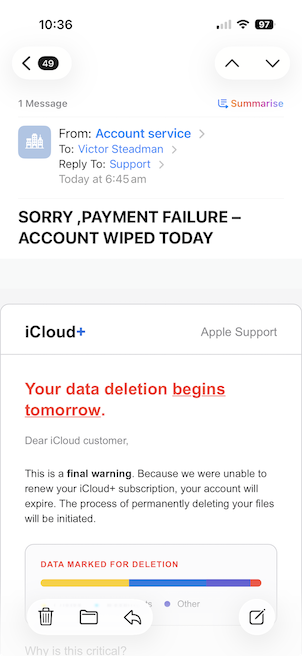
An email threatening the loss of your photographs is enough to make anyone sit up and take notice. That’s exactly what the latest scam to arrive in my inbox was counting on.
This kind of scam is called phishing. The sender pretends to be a company or person you trust, hoping to trick you into handing over passwords, payment details or other personal information.
This one claimed to be about my iCloud account.
What made me suspicious?
Pressure to act quickly
The email wanted me to believe my stored data was at risk and that I needed to act immediately. It was trying to frighten me into clicking before I stopped to think.
Urgency is a common feature of phishing emails. It isn’t proof on its own, but it’s a good reason to pause.
Branding and a vague greeting
Although the email claimed to be from Apple’s iCloud service, its appearance didn’t fit. The colours reminded me more of Google’s branding.
It also addressed me simply as “iCloud customer”. A generic greeting is another warning sign, although an email using your real name isn’t necessarily genuine either.
An unexpected sender
The sender’s display name was “Account service”. Tapping or clicking that name can reveal the full email address, depending on which email app you use.
In this case, the address shown had no obvious connection with Apple, it is a German icome tax consultancy.
That’s a strong warning sign, but checking the address isn’t a foolproof test: sender addresses can be forged.
What to do if you receive an email like this
Don’t click any links, open attachments or reply.
Check your account directly. If you’re worried about iCloud, open Settings on your iPhone or iPad, tap your name and then iCloud. Don’t use the email’s links to get there.
Report it. Forward the email to report@phishing.gov.uk, the National Cyber Security Centre’s reporting service.
Mark it as Junk or Spam, then delete it.
Take a moment before you click
For those of us who keep photographs in the cloud, a warning about losing them can feel particularly alarming. That’s what makes this trick effective.
You don’t need to become an expert at spotting every fake. If an email worries you, pause and check through the service’s usual app or your device’s settings. A few moments spent checking could save a great deal of trouble.